
How To Hide Out Of Stock Products on Shopify - No App
Many Shopify store owners ask, "How do I hide out-of-stock products?" Unfortunately, Shopify does not offer a built-in solution, and most apps that do this require a paid subscription.
In this guide, I'll show you how to hide products with zero inventory using the Shopify Storefront API via a custom Ruby without affecting pagination.
Why Shopify Doesn't Support This by Default
Editing collection.liquid to exclude out-of-stock items can break pagination and filtering. You can go through and manually adjust each collection to filter out of stock products, but this is time-consuming and not scalable if your store has lots of collections.
Many users have asked Shopify for a native fix, but they have yet to implement one: Reddit Discussion.
Free & Fast Method: Shopify Storefront API
The best way to hide out-of-stock products is by programmatically updating collection rules to include an inventory filter.
Prerequisites
- You must have Ruby installed on your computer.
- Install the required gems:
shopify_api(v14.8.0) andlogger(v1.6.6). - Create a custom Shopify app with API access.
Step 1: Create a Shopify Custom App
- Log in to your Shopify store.
- Go to Settings > Apps and Sales Channels > Develop Apps.
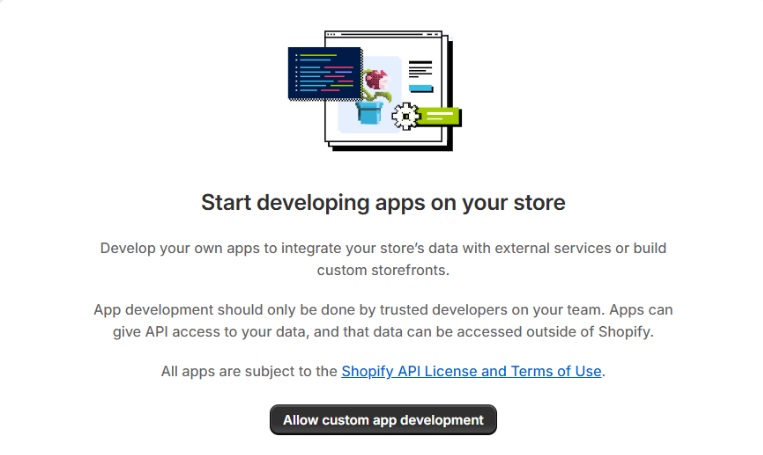
- Enable custom app development.
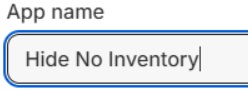
- Create a new app and name it something like
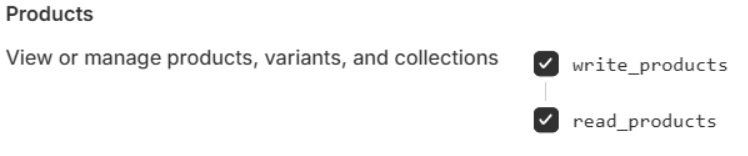
Hide Out of Stock. - Click API Credentials and allow
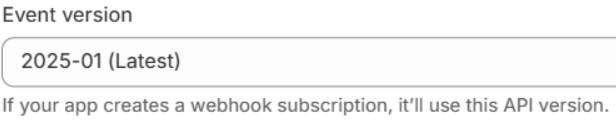
read & writepermissions for products. - Use Shopify API version 2025-01.
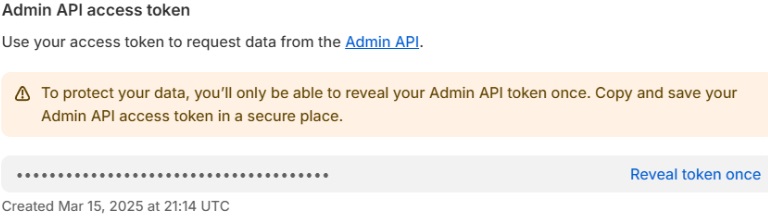
- Install the app and retrieve your Admin API Access Token.





Step 2: Run the Ruby Script
Copy the script below and save it as hide-out-of-stock-products.rb.
Replace SHOP_NAME, ACESS_TOKEN and LIMIT with your values.
#!/usr/bin/env ruby
# frozen_string_literal: true

require 'shopify_api'
require 'logger'

# Shopify store credentials
SHOP_NAME = "your-store-name"
ACCESS_TOKEN = "YOUR_ACCESS_TOKEN" # Use the admin token, not the API secret

LIMIT = 5 # Adjust as needed

ShopifyAPI::Context.setup(
  api_key: "DUMMY_VALUE",
  host_name: "DUMMY_VALUE",
  scope: "DUMMY_VALUE",
  private_shop: "#{SHOP_NAME}.myshopify.com",
  api_secret_key: ACCESS_TOKEN,
  is_embedded: false,
  is_private: true,
  api_version: "2025-01"
)

session = ShopifyAPI::Auth::Session.new(
  shop: "#{SHOP_NAME}.myshopify.com",
  access_token: ACCESS_TOKEN
)
client = ShopifyAPI::Clients::Graphql::Admin.new(session: session)

# GraphQL query to get all collections and their filters
GET_COLLECTIONS_QUERY = <<-GRAPHQL
  {
    collections(first: 100) {
      edges {
        node {
          id
          title
          ruleSet {
            appliedDisjunctively
            rules {
              column
              relation
              condition
            }
          }
        }
      }
    }
  }
GRAPHQL

response = client.query(query: GET_COLLECTIONS_QUERY)
result = response.body
errors = result.dig("errors") || result.dig("data", "collectionUpdate", "userErrors") || []

if errors.any?
  puts "❌ Error fetching collections: #{errors}"
  exit
end

collections = result.dig("data", "collections", "edges") || []
index = 0

collections.each do |collection|
  index += 1
  break if index > LIMIT

  collection_id = collection["node"]["id"]
  title = collection["node"]["title"]
  rule_set = collection["node"]["ruleSet"]

  next if rule_set.nil?

  rules = rule_set["rules"] || []
  has_inventory_filter = rules.any? { |rule| rule["column"] == "VARIANT_INVENTORY" && rule["relation"] == "GREATER_THAN" && rule["condition"] == "0" }

  unless has_inventory_filter
    new_rules = rules + [{ "column" => "VARIANT_INVENTORY", "relation" => "GREATER_THAN", "condition" => "0" }]
    update_mutation = <<-GRAPHQL
      mutation {
        collectionUpdate(input: {
          id: "#{collection_id}",
          ruleSet: { appliedDisjunctively: false, rules: [#{new_rules.map { |r| "{ column: #{r['column']}, relation: #{r['relation']}, condition: #{r['condition'].inspect} }" }.join(", ")}] }
        }) {
          collection { id }
          userErrors { field message }
        }
      }
    GRAPHQL

    update_response = client.query(query: update_mutation)
    puts update_response.body.dig("data", "collectionUpdate", "userErrors") ? "❌ Error updating #{title}" : "✅ Updated: #{title}"
  end
end
puts "🎉 Finished processing collections."
Final Steps
- Open a terminal and navigate to the script folder.
- Run:
gem install shopify_api - Run:
ruby ./hide-out-of-stock-products.rb
That's it! Your out-of-stock products will now be hidden automatically.
Need help? Feel free to contact me!
Let me know in the comments if you run into any issues or have questions.